Posts

Showing posts from October, 2010

Find your polling place and follow the US Election on the go

Image
The United States midterm election is on Tuesday, November 2, and we encourage all eligible US citizens to get out and vote. We�ve made it easy to find your polling place and follow election news by visiting our Election Center mobile site at m.google.com/elections on your Android-powered phone or iPhone. Enter the address where you�re registered to vote, and we�ll show you a Google Map of your polling place. The Election Center site also has information about candidates running for office in your area. So come Tuesday, let your mobile phone guide you to your polling place, and let sanity guide your vote! Posted by Ryan Pollock, Product Marketing Manager

New in Google Maps for Android: Updated reviews, search filters, and Latitude real-time updating

Image
Lately, we�ve been working on giving you even better ways to find nearby places with Google Maps for Android, such as the Places icon and rich Place pages . Today, we are launching Google Maps 4.6 with a new design for Place page reviews, more options to filter search results, and a Google Latitude real-time updating option. Place page reviews Now, you�ll see that Place pages on Android Maps share the same new design for displaying reviews as used by Place pages on your computer. You can see: �Reviews from around the web� for highlighting sites that have high-quality reviews about the place. �Reviews from Google users� for reviews posted directly to Google Maps by other users Filter search results Of course, you�ll first need to narrow down which Place page reviews to check out. In addition to distance and ratings , you can also filter results for some searches by: Open now Neighborhood Related searches Find the right place with the updated reviews section (left) or search results...

Bring Your Phone to Work Day: Managing Android Devices With Google Apps

Image
(Cross-posted and excerpted from the Official Google Enterprise Blog ) With over 200,000 devices activated each day, Android is seeing rapid adoption, and today we are launching new administrative controls that make it possible to securely manage these devices in the Google Apps environment. With this launch, Google Apps provides a comprehensive mobility solution for all major mobile platforms . You can manage most mobile devices right from the browser, without having to deploy dedicated servers. Many Android devices feature tight integration with Google Apps, including native applications for Gmail, Google Talk, and Google Calendar, as well as mobile access to Google Docs. Now any employee with an Android device running version 2.2 - personal or company-issued - can access their corporate information while allowing administrators to enforce data security policies such as: Remotely wipe all data from lost or stolen mobile devices Lock idle devices after a period of inactivity Require a...

Gmail in mobile Safari: now even more like a native app

Image
Go to gmail.com from your iPhone and you�ll notice two improvements we�ve rolled out over the past few weeks. First, scrolling is snappier: the speed of scrolling reflects the speed of your swipe gesture. This is helpful for long conversations where a few quick flicks will get you to the information you need much faster than before. Second, the toolbars stay on screen while you�re scrolling rather than moving down into view after each scroll. Being able to access your toolbars from any point on the page should make it easier to triage your email and move around the app. If you use Gmail in your mobile browser a lot, you may have noticed that we recently tried several different variations of these buttons. We�ve iterated on the design and made improvements based on your feedback. If you have more suggestions, please post them in our forum , or if you use Twitter, mention #gmailmobile and we'll take a look. If you�re a developer and are interested in learning about the Javascript a...

Voice Search in Russian, Polish, Czech and Turkish

Image
Over the past few weeks we have launched Voice Search in four new languages: Russian, Polish, Czech and Turkish. Try speaking queries like �???????? ???? ?????????� (tour dates for Yulia Savicheva), �przepis na pierogi� (recipes for pierogi), �obr�zky Hradcan� (pictures of the Prague castle), or �istanbul hava durumu� (weather in Istanbul). Note that you can only speak one language into the app at any time and that you�ll need to change your language setting first. Voice Search is often preloaded on new Android devices. In that case, all you have to do is press and hold the search button and then speak your query. If you have an Android (2.0 or higher) phone but don�t have Voice Search installed, download the �Voice Search� app from Android Market. If you own an iPhone or other smartphone, you can download Google Mobile App with Voice Search from m.google.com Posted by Amir Man�, Product Manager of Google Speech Technologies

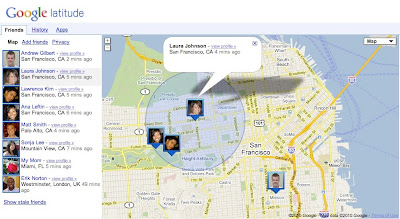
An easier way to use Google Latitude on your computer

Image
We�re happy to introduce an easier way to use Google Latitude from your computer at google.com/latitude . You can now see where your friends are, start using Latitude apps, and share your location all from one place when you�re at your computer. Find your friends We launched Latitude with a desktop iGoogle gadget to help you stay in touch with friends and family that may not have a smartphone. We�ve since learned that a desktop experience is important to you even if you�re already using Latitude on your phone. Today, you can now visit a dedicated site that makes it easier than ever to use Latitude when you�re already on your computer. From the Friends tab, you can: See where your friends are on Google Maps Add friends and accept sharing requests Control your privacy settings Do more with Latitude You�ll also now find Latitude and Latitude apps together in one place. After browsing your friends list, go to the History or Apps tabs to turn on optional Latitude apps such as: Google L...