Posts

Showing posts from February, 2011

Finding the right place when you need it

Image
Over the past few months, we have launched several new mobile search features for iPhone and Android-powered devices that make it easier to find local businesses. In the US, we launched an �open now� feature which lets you filter local search results to show only businesses that are open right now, based on their listed hours. When you�re hankering for pizza at 1 o�clock in the morning, this can be really handy: Other local search options available globally include filtering by star ratings (find a highly-rated restaurant for your first date) and by distance (especially handy when you�re on foot). You may have noticed other improvements as well, like the addition of images, reviews from around the web and bigger buttons for viewing a map or calling a business directly. Each business�s open hours are also shown in the result snippets. If you haven�t used local search recently, now is a great time to try it out. Just go to www.google.com in your browser, tap on the �Places� link at the...

5 tips for using Blogger on your Android phone

Image
Earlier this month, we announced the first version of the Blogger app for Android on the Blogger Buzz blog . Today, we�d like to share some tips on how you can use the Blogger app to quickly publish posts when you�re on the go. 1. Attach photos as you compose Take photos using your phone�s camera and instantly add them to your post while you draft. You can also insert photos from your phone�s gallery, all within the Blogger app. 2. Include your current location With your phone�s GPS, you can let your readers know where you�re blogging from by selecting your current location, no additional typing needed. 3. Share to Blogger Share videos, products, photos, links and other interesting things you would like to include in your blog via the share button that�s available in many apps, including Google Maps for mobile, YouTube, and your web browser. After you share an item to your Blogger, it will be inserted into new post that�s automatically created for you so that start can composing right...

Updates to the Google Reader app for Android

Image
(Cross-posted from the Google Reader blog ) Today we�re excited to announce some updates to the official Google Reader app for Android. Over the last couple of months, we�ve added some of your most-requested features: Unread count widget - choose any feed, label, person, or �all items� and get the unread count on your home screen. Clicking on the widget takes you to straight to that stream. News ticker widget - if you prefer a bit more information, you can add a larger size widget that cycles through items on any stream you want in Reader. Clicking any headline will take you to the article, while clicking the folder will take you to that stream. Mark previous as read - if you�ve used the mobile version of Reader before and missed this feature, it�s now back! As you scroll down your reading list, hit �Mark previous as read� at any time to only mark things above the screen as read. In addition to these new features, we now have an official Russian translation as well. We hope you enjoy t...

Introducing the Google Translate app for iPhone

Image
( Cross-posted on the Official Google Blog and Google Translate Blog . ) Back in August 2008 , we launched a Google Translate HTML5 web app for iPhone users. Today, the official Google Translate for iPhone app is available for download from the App Store. The new app has all of the features of the web app, plus some significant new additions designed to improve your overall translation experience. Speak to translate The new app accepts voice input for 15 languages, and�just like the web app�you can translate a word or phrase into one of more than 50 languages. For voice input, just press the microphone icon next to the text box and say what you want to translate. Listen to your translations You can also listen to your translations spoken out loud in one of 23 different languages. This feature uses the same new speech synthesizer voices as the desktop version of Google Translate we introduced last month . Full-screen mode Another feature that might come in handy is the ability to e...

Live Stream: Think Mobile event for mobile marketers

Looking to reach out to your customers on mobile? Join us for our live streamed discussion on February 10th, 1:05pm EST with Mary Meeker, Partner at Kleiner Perkins, Google�s Dennis Woodside, SVP of Americas Operations, and Jason Spero, Head of Americas Mobile Advertising on the future of mobile and mobile marketing. To learn more about the event and live stream, please visit the Google Mobile Ads blog . Posted by Suzanne Mumford, Google Mobile Ads Marketing Team

Priority Inbox in Gmail for mobile

Image
If you�ve ever cursed a phone�s tiny screen as utterly inadequate for sifting through an overflowing inbox you�ll be pleased to hear that the Gmail mobile web app now supports Priority Inbox . Priority Inbo x helps combat information overload by automatically identifying your important messages so you can focus on those first. Until today it was only available on the desktop and on Android devices . Now, once you set up Priority Inbox  in the desktop version of Gmail, you�ll see Priority Inbox sections when you visit gmail.com from your phone�s browser and click on the �Menu� screen. You�ll also see importance markers in your inbox, so you can quickly identify which messages are important. This feature is available for most mobile browsers that support HTML5, such as devices running Android 1.5+ and iOS 3+. Currently, you can�t set up Priority Inbox or mark messages as important or unimportant from here. If you have suggestions or want to learn more, visit our Help Center and f...

Introducing the Android Market website

Image
Over the past two years, developers around the world have helped make Android Market the go-to place for more than 100,000 apps, games and widgets. Previously, you could only access Android Market directly from your device, but today, we are introducing the Android Market website that lets you browse and search for great apps right from your web browser. The website makes it easy to discover great new apps with a bigger, brighter interface. You can also send apps directly to your Android device with just a few clicks�no wires needed. We�ve built in new social features, too. You can share apps with your friends through Twitter. And you can read and post app reviews directly to Android Market from the web or from your device. And what about all those apps you�ve already purchased and downloaded? Sign in to the website with your Google account and click �My Market Account� to see all the apps you�ve purchased or downloaded. It makes managing all your apps quite easy. The Android Market ...

Announcing Google Shopper for iPhone

Image
(Cross-posted on the Google Merchant Blog ) As we announced last November, millions of people have downloaded Google Shopper for Android to help them shop on the go. Today, we�re excited to let you know that Google Shopper, our popular Android shopping application, is now available for iPhone as a download in the App Store . Google Shopper turns your iPhone into a shopping assistant, so you can: Learn more about products and read relevant user reviews Compare prices at online and local stores Save and share products for later consideration Let�s say you�re planning a special meal for Valentine�s Day - but you need a cast-iron skillet to get the recipe just right. With Shopper, finding one is easy enough: just type in �cast iron skillet� or say it using Voice Search. Then, from the results, you can choose a specific product that appeals to you. Alternatively, if you were in the store and wanted to see product reviews, you could also scan the barcode of a particular product. Once yo...

Check in with Google Latitude

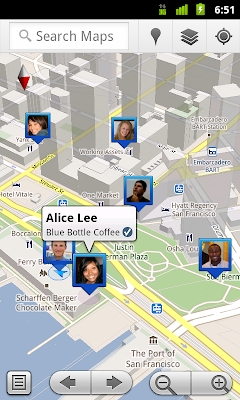
Image
(Cross-posted with the Official Google Blog ) We first introduced Google Latitude to help you stay in touch with your friends and family by making it easy to share where you are. For the 10 million people actively using Latitude each month, this �where� has been a location on a map. Starting today in Google Maps 5.1 for Android, you can also connect that location to a real place by checking in there using Latitude . Connecting your location with places You can still use Latitude to automatically update and share your location, but check-ins let you add context to the location�like captions to a photo. For example, I live in San Francisco but often travel around the world. Until today, sharing my location let friends and family know if I was across the globe or in their neighborhood. Now, check-ins let them see the cool restaurant I�m trying in Taipei or join me for a latte at the cafe nearby. See where your friends are on a map and where they�re checking in. Not your typical check-in...