Posts

Showing posts from March, 2011

Stay connected to the market, wherever you are

Image
Mobile phones are great for keeping in touch with the latest information, but when there�s a lot of data to look at, a small screen can be a drawback. For financial queries, where you might want to see stock quotes, the latest news, a market overview or portfolio details, we�ve just launched a new approach in Google search. To try it out, go to google.com on your iPhone or Android-powered device (2.1 or later) and search for your favourite stock ticker symbol. The first thing you�ll see is an interactive graph shown on a card - you can switch views to different date ranges by tapping on the buttons below the graph. If you swipe the card from right to left, you�ll get the latest financial news for the company. Swipe again for a market overview, and if you�re logged in to your Google account and have created a Google Finance portfolio, a further swipe will show a summary of your stock portfolio. Give it a try on your mobile device now to see how it works. This feature is available in ...
Word of Mouth: Introducing Voice Search for Indonesian, Malaysian and Latin American Spanish

(Read more about the launch of Voice Search in Latin American Spanish on the Google Am�rica Latina blog ) Today we are excited to announce the launch of Voice Search in Indonesian, Malaysian, and Latin American Spanish, making Voice Search available in over two dozen languages and accents since our first launch in November 2008. This accomplishment could not have been possible without the help of local users in the region - really, we couldn�t have done it without them. Let me explain: In 2010 we launched Voice Search in Dutch, the first language where we used the �word of mouth� project, a crowd-sourcing effort to collect the most accurate voice data possible.The traditional method of acquiring voice samples is to license the data from companies who specialize in the distribution of speech and text databases. However, from day one we knew that to build the most accurate Voice Search acoustic models possible, the best data would come from the people who would use Voice Search once it...

Explore the world with updated apps for iPhone: Check in with Latitude and use Places in 30 languages

Image
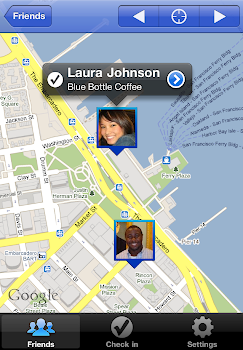
We�re happy to announce updates for two iPhone apps that help you connect the people you care about with the places you love: Google Latitude with check-ins and Google Places in 30 languages. Check in with Google Latitude for iPhone After adding check-ins to Google Latitude for Android-powered devices, we�re happy to announce that you can now start checking in at places with the updated Latitude app for iPhone . With Google Latitude, you can see where your Latitude friends are on a map and choose to continuously share where you are . Now, you can also choose to check in at specific places, such as your favorite restaurant or a park, to add more context to your location. You'll be able to not only let friends know that you�re just around the corner but also let them know the actual coffee shop that you�re at in case they want to join you. If Latitude is set to continuously update your location, you�ll also be automatically checked out when you leave. This way, friends aren�t left...

Introducing Nexus S 4G for Sprint

Recently, we introduced Nexus S from Google, the first phone to run Android 2.3, Gingerbread. In addition to the UMTS-capable Nexus S, today we�re introducing Nexus S 4G from Google, available for Sprint. Nexus S 4G is part of the Nexus line of devices which provide a pure Google experience and run the latest and greatest Android releases and Google mobile apps. We co-developed Nexus S 4G with Samsung to tightly integrate hardware and software and highlight the advancements of Gingerbread. Nexus S 4G takes advantage of Sprint�s high-speed 4G data network. It features a 4� Contour Display designed to fit comfortably in the palm of your hand and along the side of your face. It also features a 1GHz Hummingbird processor, front and rear facing cameras, 16GB of internal memory, and NFC (near field communication) hardware that lets you read information from everyday objects that have NFC tags. In addition, today we�re excited to announce that Sprint customers will soon be able to take advant...

Google Search app for iPhone�a new name and a new look

Image
If you need to do a Google search on your iPhone or iPod touch it's now faster and easier when you use our redesigned Google Search app, formerly Google Mobile App. If you've been using Google Mobile App for a while, you'll notice that things look different. The redesigned home screen of Google Search app. First, you�ll see that there are now more ways to interact with the app. When browsing through search results or looking at a webpage, you can swipe down to see the search bar or change your settings. For those who use other Google apps, there�s an Apps button at the bottom of the screen for rapid access to the mobile versions of our products. We also included a new toolbar that will make it easier for you to filter your results. You can open this toolbar by swiping from left to right � either before you search or once you�ve got your results. If you only want images, just tap �Images,� and the results will update as shown: The toolbar helps you to get to the right kind...

Instant Previews now available on mobile

Image
( Cross-posted from the Official Google Blog ) Instant Previews provides a fast and interactive way to evaluate search results. Starting today, Google Instant Previews is available on mobile for Android (2.2+) and iOS (4.0+) devices across 38 languages. Similar to the desktop version of Instant Previews, you can visually compare search results from webpage snapshots, making it easier to choose the right result faster, especially when you have an idea of the content you�d like to see. For example, if you�re looking for a webpage that has both photos and descriptions, you can use Instant Previews to quickly identify these pages by navigating across the visual search results with a few swipes of your finger. Or perhaps you�re looking for an article, a step-by-step instructions list, or a product comparison chart�with Instant Previews, you can easily spot pages with the right content without having to navigate back and forth between websites and search results. And when the mobile version...

You�ve got better things to do than wait in traffic

Image
Ever been stuck in traffic, only to find out you�d have been better off going a bit out of your way to take a less congested route? If you�re like me, you probably hear the traffic report telling you what you already know: traffic is bad on the road you�re currently on, and you should have taken another. It doesn�t need to be this way, and we want to help. So we�re happy to announce that Google Maps Navigation (Beta) will now automatically route you around traffic. With more than 35 million miles driven by Navigation users every day, this should add up to quite a bit of time saved! On a recent trip to New York, I was running late to meet some friends at the Queens Museum of Art. I had no idea that there was a traffic jam along the route I would normally have taken. Thankfully, Navigation routed me around traffic. I didn�t even have to know that there was a traffic jam on I-495, and I got to enjoy a much faster trip on I-278 instead. Navigation now uses real-time traffic conditions to ...

An Update on Android Market Security

On Tuesday evening, the Android team was made aware of a number of malicious applications published to Android Market. Within minutes of becoming aware, we identified and removed the malicious applications. The applications took advantage of known vulnerabilities which don�t affect Android versions 2.2.2 or higher. For affected devices, we believe that the only information the attacker(s) were able to gather was device-specific (IMEI/IMSI, unique codes which are used to identify mobile devices, and the version of Android running on your device). But given the nature of the exploits, the attacker(s) could access other data, which is why we�ve taken a number of steps to protect those who downloaded a malicious application: We removed the malicious applications from Android Market, suspended the associated developer accounts, and contacted law enforcement about the attack. We are remotely removing the malicious applications from affected devices. This remote application removal feature i...

Tweet your Hotpot ratings in Google Maps for Android

Image
(Cross-posted on the Hotpot Blog and the LatLong Blog .) Whether it�s Google Places with Hotpot or Google Latitude , we�re working on helping you connect the people you care about with places you love. Now, when you�re rating your dinner spot using Google Maps for Android , you can share your review with even more people by posting it to Twitter. Post your ratings and reviews to Twitter When you rate and review places like restaurants or cafes from Google Places , you can share valuable recommendations with your Hotpot friends and across Google�s products � in search results , on google.com/hotpot , and on Place pages. But we wanted you to be able to share your recommendations even more broadly. So today, you can start sharing your ratings and reviews with your followers on Twitter directly from your Android-powered device. When rating on the go using our rating widget , just choose to Post review to Twitter and connect your Twitter account. You�ll get a preview of your tweet and wi...

Mobile editing in Google Docs now in 45 languages

Image
Last November, we launched the ability to edit mobile docs in English . Today we�re excited to announce that you can now edit your docs on the go in 44 more languages . To begin editing, visit docs.google.com in your mobile browser, and select a document to edit. Switch from view to edit mode by pressing �Edit� to turn on the mobile editor and start typing away. As a reminder, mobile editing is available on Android (2.2+) and iOS (version 3.0+) devices. You can learn more about Google Docs for mobile on www.google.com/mobile . As always, feedback in the comments and on the forums is appreciated. Posted by Carmen Wilkinson, Software Engineer

Honeycomb Buzzes On In

Image
Yesterday morning, a tasty treat arrived on our campus. And what better way to welcome Honeycomb to the Android family than with redecorating the lawn of Building 44 a bit? Posted by Andy Rubin, VP of Android Engineering