Posts

Showing posts from May, 2011

Coming soon: make your phone your wallet

Image
(cross-posted to Official Google Blog and Google Commerce Blog ) Today in our New York City office, along with Citi, MasterCard, First Data and Sprint, we gave a demo of Google Wallet , an app that will make your phone your wallet. You�ll be able to tap, pay and save using your phone and near field communication (NFC). We�re field testing Google Wallet now and plan to release it soon. Google Wallet is a key part of our ongoing effort to improve shopping for both businesses and consumers. It�s aimed at making it easier for you to pay for and save on the goods you want, while giving merchants more ways to offer coupons and loyalty programs to customers, as well as bridging the gap between online and offline commerce. Because Google Wallet is a mobile app, it will do more than a regular wallet ever could. You'll be able to store your credit cards, offers, loyalty cards and gift cards, but without the bulk. When you tap to pay, your phone will also automatically redeem offers and earn...
Check-ins and rating places get easier with Google Maps 5.5 for Android

Image
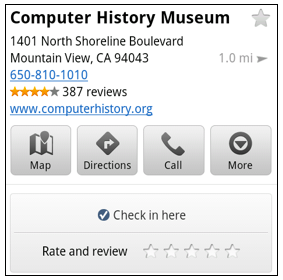
(Cross posted from Google LatLong Blog ) We�ve made it easier to check in and out of places, rate various locations, and get transit information with Google Maps 5.5 for Android . This release adds �check in� and �rate and review� buttons to Place pages, the option to edit your home/work address for Latitude, and redesigned transit station pages. Read below for more details about the new features, which we hope will improve your user experience, a topic we take very seriously as there are now more than 200 million users of Google Maps for mobile across platforms and devices worldwide. New check-in and rating buttons added to Place pages Now when you open a Place page from your mobile device, you can check in to places with Google Latitude or submit a rating or review by clicking on two new buttons at the top of the listing. This past week I had the chance to explore the Computer History Museum during my visit to San Francisco from across the pond in London. Once nearby, I could qui...

Google Maps on your mobile browser

Image
(Cross-posted from the Google Lat Long Blog ) With 40% of Google Maps usage on mobile devices, we want you to have a consistent Google Maps experience wherever you use it. So, today we�re announcing our updated Google Maps experience for mobile browsers on Android and iOS. Now, when you visit maps.google.com on your phone or tablet�s browser and opt-in to share your location, you can use many of the same Google Maps features you�re used to from the desktop. This will allow you to: See your current location Search for what�s nearby with suggest and auto complete Have clickable icons of popular businesses and transit stations Get driving, transit, biking, and walking directions Turn on satellite, transit, traffic, biking, and other layers View Place pages with photos, ratings, hours, and more When signed into your Google account, access your starred locations and My Maps This past weekend, I was at a team off-site at a ropes course and needed to find a good deli spot to grab lunch. I o...

Launch a mobile business with The Guide to the App Galaxy

The Guide to the App Galaxy , which we showed off last week at  Google I/O , is designed to help mobile app developers�regardless of platform�navigate the complexities of launching an app and building a business on mobile. As you maneuver through the "galaxy� using the arrow keys on your keyboard, you�ll get the basics about app promotion, monetization and measurement�with tips from Google as well as successful developers. Read more on the Official Google Blog . Post content by Lauren Usui,  Product Marketing Manager

Google Search app for iOS, now even faster and easier to use

Image
Two months ago, we launched a redesign of the Google Search app for iOS. We were happy that many of you liked the new look and interactivity of the app. However, we also heard your feedback about the app�s speed. Today we�re introducing changes that make the app more responsive as well as other visual changes that make search results even easier to read. Faster app performance This version of Google Search app is up to 20% more responsive as you type search queries and interact with it. As part of the speed improvements, a feature called �Just Talk� will now be off by default. Just Talk allowed you to search via voice just by bringing the phone to your ear and speaking rather than tapping the microphone icon. Turning off this feature may improve app performance, though you can easily re-enable it under the Settings > Voice Search menu. Turn Just Talk on or off Improved look & feel for search results When searching on a phone, the small screen sometimes makes it difficult to re...

Introducing �News near you� on Google News for mobile

Image
(Cross-posted from the Google News blog ) Google News for mobile lets you keep up with the latest news, wherever you are. Today we�re excited to announce a new feature in the U.S. English edition called �News near you� that surfaces news relevant to the city you�re in and surrounding areas. Location-based news first became available in Google News in 2008 , and today there�s a local section for just about any city, state or country in the world with coverage from thousands of sources. We do local news a bit differently, analyzing every word in every story to understand what location the news is about and where the source is located. Now you can find local news on your smartphone. Here�s an example of a �News near you� mobile section automatically created for someone in Topeka, Kansas: To use this feature, visit Google News from the browser of your Android smartphone or iPhone. If this is the first time you are visiting Go...

New ways to discover great apps on Android Market

Image
We�ve seen tremendous growth in Android Market lately. With over 200,000 apps supporting over 300 Android devices, we�ve had 4.5 billion applications installed to date. But with so many apps available, how do you find the ones you really want? Whether you�re looking for the most popular apps, hot new apps, or just the very best apps available, we want to help make sure that you find what you�re looking for. Today, we�re excited to announce 5 new features for Android Market focused on helping you find apps you�ll love. New top app charts - We�ve revamped our top app charts to be fresher and country-specific, so you get the most current, relevant results. We�ve also added top new free, top new paid, and top grossing lists, all right on the Android Market home page.    Editors� Choice -  These are some of the very best apps available for Android, as chosen by the Android Market staff. They span everything from games to productivity and beyond.    Top Developer...

Google I/O: countdown to the keynote kickoff

(Cross-posted from the  Code Blog ) In less than 24 hours, we�ll be kicking off Google I/O 2011 , our annual developer conference here in San Francisco. This year�s keynote presentations will highlight the biggest opportunities for developers and feature two of our most popular and important developer platforms: Android and Chrome. Google engineers from Andy Rubin and Sundar Pichai�s teams will unveil new features, preview upcoming updates, and provide new insights into the growing momentum behind these platforms. Plus, for the first time in Google I/O history, you�ll be able to join us throughout the two days at I/O Live . We�ll live stream the two keynote presentations, two full days of Android and Chrome technical sessions, and the After Hours party. Recorded videos from all sessions across eight product tracks will be available within 24 hours after the conference. Whether you�ll be joining us in San Francisco or from the farthest corner of the world, bookmark  www.google....

Share and personalize your Google Goggles experience with Goggles 1.4

Image
Since its launch, we have worked to make Google Goggles faster and more accurate when returning search results for a wide variety of images. Today, we are taking several steps to make Goggles a better and more personal experience. Goggles 1.4 for Android devices introduces an enhanced search history experience, the ability to suggest better results to Google if we are not able to accurately match your image, and improved business card recognition. Enhanced search history The new search history experience lets you search your Goggles results, make personal notes on specific results and share your results with friends. When you add a personal note to a Goggles result, the note will appear in your search history. I�m trying to learn more about wine, so when I taste something new, it�s easy for me to add a note to help me remember what I liked about the wine. Later, I can search my search history for words in my note to help me find that bottle that went so well with steak. Read more abo...

Google Earth optimized for Android-powered tablets

Image
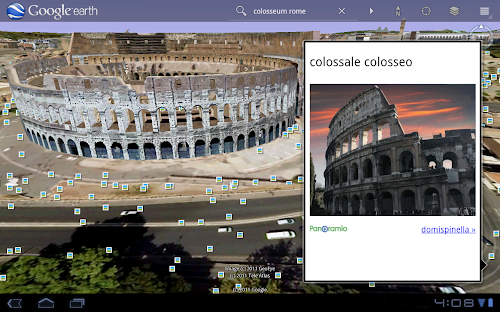
Cross-posted from the Official Google Blog When we launched Google Earth in 2005, most of us were still using flip phones. At the time, the thought of being able to cart around 197 million square miles of Earth in your pocket was still a distant dream. Last year, that dream came to fruition for Android users when we released Google Earth for Android . With the recent release of tablets based on Android 3.0, we wanted to take full advantage of the large screens and powerful processors that this exciting new breed of tablets had to offer. Today�s update to Google Earth for Android makes Earth look better than ever on your tablet. We�ve added support for fully textured 3D buildings, so your tour through the streets of Manhattan will look more realistic than ever. There�s also a new action bar up top, enabling easier access to search, the option to �fly to your location� and layers such as Places , Panoramio photos , Wikipedia and 3D buildings. Moving from a mobile phone to a tablet was l...

Google Voice and Sprint integration is live

Cross-posted from the Google Voice Blog .  It�s official, the Google Voice integration with Sprint is now live! As we mentioned when we first announced the integration , there are two ways to bring Google Voice to your Sprint mobile phone: Option 1: Keep your Sprint number : Your Sprint number becomes your Google Voice number so that when people call your Sprint mobile number, it rings all the phones you want. Option 2: Replace your Sprint number with your Google Voice number : All calls made and texts sent from your Sprint phone will display your Google Voice number. In both cases, Google Voice replaces Sprint voicemail and international calls made from the Sprint phone will be connected by Google Voice. For detailed instructions on how to get started with either option, visit google.com/voice/sprint . This integration is currently only available to Sprint customers in the United States. Posted by Patrick Moor, Software Engineer