Posts

Showing posts from July, 2011

New Google Search experience for tablets

Image
(Cross-posted on the Inside Search blog ) As part of our effort to evolve the Google design and experience , we�ve improved the www.google.com search experience on tablets. We�ve simplified the layout of search results pages and increased the size of page contents like text, buttons and other touch targets to make it faster and easier to browse and interact with search results in portrait or landscape view. The search button located below the search box provides quick access to specific types of results like Images, Videos, Places, Shopping and more. Just tap to open the search menu and select an option to see results in one category. For image results, we focused on improvements that enhance the viewing experience such as enlarged image previews, continuous scroll, and faster loading of image thumbnails. This improved search experience is rolling out in the coming days to iPad and Android 3.1+ tablets across 36 languages. Give it a try by going to www.google.com in your tablet�s bro...

Catch the London Underground with Google Maps

Image
Today, Google Maps added public transport directions for London within Google Maps , including Google Maps for mobile on iOS, Blackberry, and Android-powered devices. Now, whether you live in London or are just visiting, you can get public transport directions on your mobile device. Public transport directions in Google Maps for Android Google Maps for mobile uses your current location to determine the best trip to your destination. Just search for your destination location, select it on the map and choose the �Directions� option. The suggested trips will be based on your location by default, and provide you multiple alternatives whenever possible. If you�re using an Android-powered device, you can also get public transport directions with Transit Navigation (Beta) in Google Maps. With this feature, you�ll get alerts when it�s time to get off the bus or train at your destination or to make a transfer. We hope that public transport directions in London make getting around town more c...

Google Maps 5.8 for Android adds photo uploads, My Places, and more

Image
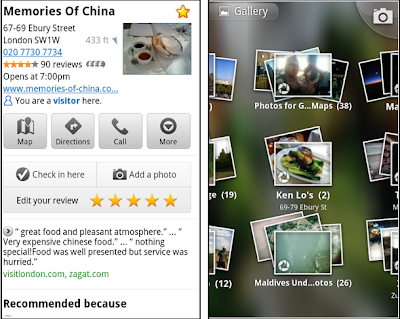
Today, Google Maps 5.8 for Android improves Places and Latitude with: Upload photos for a Place My Places as a simple way to manage the Places you�ve starred and recently viewed Descriptive terms for Places in search results Add a new Place on-the-go when checking in Photo upload for a Place When deciding on a place to go, people often want to know what a place looks like in addition to seeing ratings and reviews. You can now contribute photos to help others get a sense of places. You can now attach your photos to Places, and yours may even become the profile picture for that page. If you want to view or delete any photos you�ve contributed to Places, you can manage uploaded photos in the �Photos for Google Maps� album on your Picasa account. Left: Uploading pictures to a place. Right: Photos in Android Gallery My Places and descriptive terms for mobile In June we announced descriptive terms and �My Places� for the desktop. Both these features are now in Google Maps for mobile. D...

Find nearby deals with Google Shopper 1.5 for iPhone

Image
(Cross-posted on the Google Commerce Blog ) We�ve recently made a few new changes to Google Shopper for iPhone that makes it easy to find nearby deals when you�re on-the-go. In the latest version of Google Shopper, in addition to the �Shop� tab, you�ll now see two new tabs at the bottom of the app: Offers and My Offers. The Offers tab displays a list, or map view, of nearby offers which businesses have submitted through Google Places - from restaurant and movie theater deals to discounts on tennis lessons or a round of golf. Let's say you come across an offer for free dessert at a nearby restaurant, but you won't have time to use it until the weekend. You can save the offer for future use, then later view and redeem it from the My Offers tab. Additionally, if Google Offers are available in your city, you�ll be able to view and redeem your purchased offers on the My Offers tab. Google Offers are currently available in Portland, Oregon, the San Francisco Bay Area and New York, ...

Nexus S Comes to AT&T

Since launching Nexus S with Samsung, T-Mobile and Sprint customers have enjoyed the pure Google experience, running the latest Android releases and Google mobile apps. Today we�re excited to announce a Nexus S device optimized for AT&T, available in Best Buy stores this weekend. Nexus S runs Android 2.3 and features a 4� Super AMOLED screen, a 1 GHz processor for showing 3D graphics, front and rear facing cameras and support for NFC. It also features the latest Google mobile apps, including Google Earth, Google Maps with Navigation, Google Talk with video chat, Google Voice and Voice Actions, as well as access to more than 250,000 apps in Android Market. Nexus S for AT&T will be available in Best Buy stores starting July 24. For those of you who just can�t wait, it�s on pre-sale today in Best Buy stores. You can find more information at google.com/nexus or follow @googlenexus on Twitter for the latest Nexus S updates. And if you need something to pass the time until you ...

3D buildings in Google Maps for Android arise in London, Paris, Barcelona, and more

Image
Last December, the release of Google Maps 5.0 for Android ushered in the next-generation of mobile maps where you can rotate, tilt, and zoom in and out of 3D maps . Whether you�re on the go or playing with a new phone, seeing a 3D skyline spring up in New York City , Zurich , Milan , and other cities is a helpful, fun, and unique experience--an experience we want as many of you as we can to have for your city. We've been adding more cities and you will now find that 3D buildings are available in London , Paris , Barcelona , Stockholm , Singapore , Lisbon , Boulder , and 11 major cities in South Africa . 3D buildings in London and Barcelona You don�t need to update the app, just open Google Maps for mobile on your phone with Android 2.0+ and zoom in to a city with 3D buildings. Enjoy! Posted by Brian Brewington, Software Engineer

Live traffic information for 13 European countries

Image
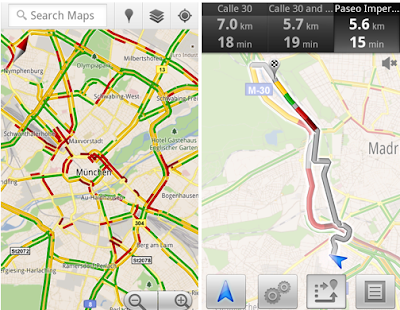
Today Google Maps added live traffic coverage for 13 European countries : Austria, Belgium, Czech Republic, Denmark, Germany, Ireland, Israel, Luxembourg, Netherlands, Poland, Slovakia, Spain and Switzerland. The new traffic information will automatically be available in Google Maps for Android, iOS, and mobile browsers. Left: Traffic layer in Munich Right: Getting routed around traffic in Google Maps Navigation With the addition of live traffic data, users in these countries will now also be able to be routed around traffic in Google Maps Navigation (Beta) to save precious minutes when possible. Posted by Noam Ben-Haim, Product Manager

A new Android Market for phones, with books and movies

Image
Recently, we�ve been hard at work improving Android Market to give you new ways to find great applications and games , purchase books , and rent movies . Today, we�re releasing a new version of Android Market which makes all of these available on phones (Android 2.2 and higher). In the U.S., you�ll be able to rent thousands of movies, starting at $1.99, right from Android Market on your phone. With the Videos app , available in Android Market, there�s no more waiting for downloads, syncing, or worrying about storage space. Simply sign into Android Market with your Google account, and you can rent movies from anywhere � the web , or your Android phone or tablet � and start watching instantly. You can also download movies to your device so they�re available for viewing when you don�t have an internet connection. Also in the U.S., you can now purchase books from Android Market on your phone. Like movie rentals, books are linked to your Google account, so they�re instantly available acros...

Finding great deals is easier with Google Shopper 2.0

Image
Today we�re announcing a new set of features in Google Shopper for Android to make it even easier to research products and find great value deals when you�re on-the-go. First, we�ve moved features around a bit to help you perform common tasks more quickly. For example, the �Starred� and �History� buttons are now at the top of the page. We�ve also added new tabs to the bottom of the screen for fast navigation to Google Shopper�s newest features. With Google Shopper, you can now find, save and redeem offers at nearby businesses through three tabs: Today�s Offer : part of the Google Offers beta program, this tab displays a single offer for discounted goods or services in your area. Today's Offer is currently available in Portland, Oregon, the San Francisco Bay Area and New York, with other cities to follow. Nearby Offers : when you click this tab, you'll see offers in the 'Eat' and 'Play' categories which nearby businesses have submitted through Google Places . My...

Share your docs on the go with the improved Google Docs for mobile

Image
(Cross-posted from the Google Docs blog ) Google Docs is about collaboration, but as many of us know, others often rely on us even when we�re nowhere near a computer. That�s why we�re excited to bring the features you need to your tablet and mobile device�s browser. Today, we've updated the look of Google Docs for mobile browsers and added the ability to sort, narrow, and share multiple docs in your mobile docs list. To get started, go to docs.google.com from your supported device �s browser. Press Sort to organize the list of docs visible in the mobile browser, or press Narrow by to specify the subset of docs you�d like to see. To share from your mobile docs list, select one or more documents, press the Share button, and select Share , Get the link to share for public or unlisted docs, or Email as attachment . Sharing a doc in your mobile browser works the same way as it does on the desktop. We�re committed to improving the experience of accessing your docs from your mobile d...

�Download map area� added to Labs in Google Maps for Android

Image
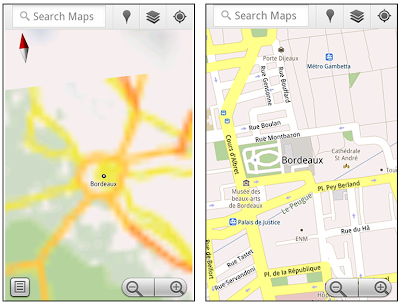
(Cross-posted on the Official Google Blog ) One way we bring you new product features is through Google Labs �a collection of fun, experimental features you can turn on if you�re interested in the functionality. In fact, Google Maps itself started as a lab . In addition to our desktop Maps Labs , Google Maps for Android has a few tricks you can try out right from your phone. We�d like to introduce you to one new experimental feature, �Download map area," but also remind you of two other ones we already have: �Scale bar� and �Measure.� Download map area When you�re visiting an unfamiliar location, Google Maps for mobile is great for getting an idea of how close you are to your destination, where streets and landmarks are in relation to each other, or just for getting �un-lost.� But what if you don�t have a data signal, or you�re abroad and don�t have a data plan? We say that if you use Google Maps for mobile, you�ll never need to carry a paper map again. The �Download map area� la...

Google Maps 5.7 for Android introduces Transit Navigation (Beta) and more

Image
(Cross-posted on the Official Google Blog ) Today we�re releasing Google Maps 5.7 for Android . From Bangkok to Baltimore, we�ve added Transit Navigation (Beta), updated access to directions, better suggested search results, and a photo viewer to Place pages�all of which can help you whether you�re traveling to an unfamiliar part of town or visiting a city across the world. Transit Navigation (Beta) Google Maps Navigation (Beta) currently provides over 12 billion miles of GPS-guided driving and walking directions per year. Now, GPS turn-by-turn (or in this case, stop-by-stop) navigation is available for public transit directions in 400+ cities around the globe with Transit Navigation. Transit Navigation uses GPS to determine your current location along your route and alerts you when it�s time to get off or make a transfer. This is particularly helpful if you�re in a city where you don�t speak the language and can�t read the route maps or understand the announcements. After starting y...